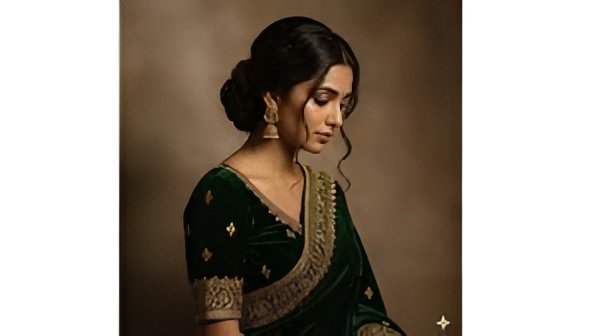
The introduction of artificial intelligence has resulted in the evolution of the creative process, particularly in the area of photo editing. Among the tools that are most remarkable today is Gemini AI, which allows the generation of gorgeous retro-style vintage photos based on mere text inputs. Gemini AI has already made successful transformations of ordinary people into nostalgic 70s glamour, 80s film portraits, 90s VHS, and even Polaroid aesthetics within seconds, drawing professional-looking results for both males and females.
Retro photography is taking over Instagram and other social media platforms again, and thus, the creators, influencers, photographers, and ordinary users are looking for more and more ways to bring back the visuals of the past. If you are in the process of hunting down the top Gemini AI prompts for vintage photo editing, then this guide is the perfect fit for you, as it comprises all the necessary information.
What Is Retro-Style Vintage Photo Editing?
The retro vintage editing technique brings back the charm of past decades’ photos, particularly those taken in the 1970s, 1980s, and 1990s. As a rule, the edits contain soft film grain, faded colors, warm tones, light leaks, low contrast, scratches, dust texture, and classic camera effects like Polaroid borders. The end result is a look that is nostalgic, emotional, and timeless, a look that modern HD photos often lack.
Gemini AI, by relying on these elements, is able to grant the user the power to choose the era, mood, lighting, and camera style while at the same time not requiring any advanced editing skills.
Why Use Gemini AI for Vintage Editing?
Gemini AI stands out for retro photo creation because it:
- Generates unique styles using simple text descriptions
- Requires no professional editing software or experience
- Works for boys, girls, couples, and group portraits
- Allows customization of lighting, colour tone, and era
- Produces social media–ready, aesthetic visuals instantly
Step-by-Step Process: How to Create Retro Vintage Photos Using Gemini AI
Step 1: Open Gemini AI
Either way, either through a web browser or the app (if that is more convenient for you), log in to your Gemini AI account. After that, you are allowed to do any image generation.
Step 2: Upload a Photo (Optional)
There are two options for you: one option is to upload your current photo that you want modified and the other one is to let Gemini AI to create the new portrait entirely from scratch following the info you provided.
Step 3: Enter a Retro Prompt
Choose one admission from the assortment and personalize it by modifying the specifics. The factors you can mention are age, sex, feeling, period (70s, 80s, 90s), and type of camera (Polaroid, VHS, Kodak, Fujifilm) with different levels of variation.
Step 4: Choose Output Style
Clicking 1:1, 4:5, or 16:9 on Instagram, Portrait, and Wallpaper will automatically remove the aspect ratio for you to rearrange the arrangement.
Step 5: Generate the Image
Click “Create” and let Gemini AI produce your vintage image in seconds.
Step 6: Save & Enhance
Download the image and apply optional effects like extra grain, noise, soft glow, or retro frames.
10 Best Gemini AI Retro Vintage Photo Prompts
1. 80s Retro Film Portrait (Boys/Girls)
Prompt:
“Create a 1980s retro film portrait of a [boy/girl], warm tones, heavy film grain, vintage Kodak camera look, faded shadows, light leaks, analog photography style.”
2. Polaroid Vintage Aesthetic (Boys/Girls)
Prompt:
“Polaroid-style vintage portrait of a [boy/girl], soft pastel tones, washed colours, date stamp, mild scratches, classic polaroid frame.”
3. 90s Street Style Retro (Boys)
Prompt:
“90s urban street-style portrait of a boy, denim jacket, high-contrast vintage tones, film dust, grunge aesthetic.”
4. 70s Classic Glamour (Girls)
Prompt:
“1970s retro glamour portrait of a girl, golden glow, soft blur, analog film grain, vintage studio lighting.”
5. VHS Tape Retro Look (Boys/Girls)
Prompt:
“VHS retro portrait of a [boy/girl], scanlines, low saturation, timestamp, nostalgic home-video style.”
6. Grunge Retro Film Dust (Boys)
Prompt:
“Vintage grunge portrait of a boy, dark tones, scratched film overlay, muted colours, 90s alternative aesthetic.”
7. Soft Romantic Vintage (Girls)
Prompt:
“Soft romantic vintage portrait of a girl, pastel tones, dreamy glow, classic film grain.”
8. Retro Travel Postcard Style
Prompt:
“Retro travel postcard-style portrait of a [boy/girl], washed colours, warm sunlight, worn postcard texture.”
9. Old Newspaper Vintage Edit (Boys/Girls)
Prompt:
“Black-and-white newspaper-style vintage portrait of a [boy/girl], grainy texture, retro printing dots.”
10. Retro Cinematic Movie Still (Boys/Girls)
Prompt:
“Retro cinematic movie still of a [boy/girl], 1980s film style, cinematic lighting, soft grain, dramatic colour grading.”
Tips for Best Results
- Add clothing details like denim jackets, floral dresses, or oversized sweaters
- Mention lighting styles such as golden hour, soft studio glow, or neon 80s lighting
- Use era-specific keywords like 70s vintage, 80s film camera, or 90s VHS
- Include texture preferences—grain, dust, scratches, borders
- Keep expressions natural for authentic retro appeal
Conclusion
Gemini AI does the unthinkable in timeless vintage photo editing and giving it to everybody’s hands and easy to use. The 10 prompts make it very quick to get professional-quality results in any of the styles that you like: classic 70s glamour, gritty 90s street style, dreamy romantic portraits, and cinematic retro visuals. Just pick a prompt, alter it a little bit, and allow the Gemini AI to revive the memories of the past in a matter of seconds.