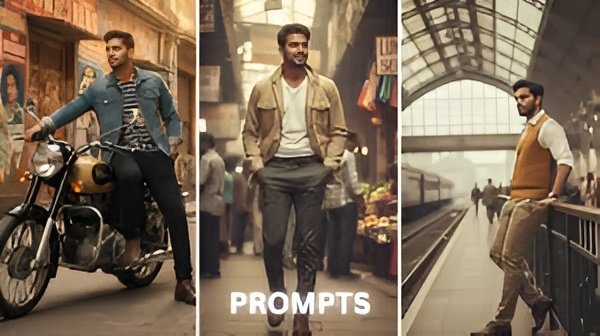
The vintage vibes are trending again, and the photo editing powered by AI is the easiest way to make beautiful retro pictures. For guys who want to add a historical look to their pictures, Gemini AI’s retro style editing prompts provide amazing chances. Now, let’s go through the process of using 10 AI prompts for a flawless vintage effect with a detailed guide.
1. Classic Film Grain
Crank up the subtle grain in your images just a bit to get the look of the 80s and 90s film photographic texture. Gemini AI lets you adjust the level to give it a true retro feel.
2. Muted Color Palette
Go with soft, desaturated shades for bringing off a classic and old-school feel.
3. Sepia Tones
Give your photographs a warm, brownish color that resembles the time of early photographic prints. Suitable for outdoor views and the loudest of nostalgic memories.
4. Retro Lighting Effects
Simulate the soft glow and highlights of vintage cameras. Interfaces provided by Gemini Al simulate natural lens flares or artificial lighting for a cinematic look.
5. Polaroid Borders
Frame your images with Polaroid-style borders for an instant shot of retro appeal, like the 70s or 80s kid. Through Gemini AI, these borders can generate in just seconds.-
6. Vintage Text Overlays
You can add retro fonts and quirky stickers. Look for an inspiration in by-gone-era magazines, posters, and comic texts which impart character to your photo.
7. Light Leak Effects
Create an effect of a light leak similar to the one an old analog camera would have had. Such an incidence of bright streaks adds to every shot the charm of an element of surprise.
8. Faded Shadows
Reduce contrast and fade shadows slightly for that “aged photo” look. Gemini AI provides precise control over shadow softness.
9. Nostalgic Backgrounds
Try to switch to outdated backgrounds like the ones portrayed in olden-day movies. For a soothing change, old houses, rural environments, or several other such options could be ideal.
10. Polished Vintage Portraits
Polished appearance, finally, is achieved by combining all effects. With the help of Gemini AI, vintage portrait can be created step by step by layering effects and making them cohesive.
Step-by-Step Process:
- Upload your photo to Gemini AI.
- Choose your preferred vintage effect from the 10 prompts.
- Adjust intensity, lighting, and textures.
- Preview and fine-tune each effect.
- Apply multiple prompts sequentially for a layered vintage style.
- Save and share your retro masterpiece.
AI instruments like Gemini have made retro photo editing a simple click-and-go activity instead of a complicated manual process. The male population and photographers can produce one-of-a-kind, vintage-looking pictures in just a few minutes while adventuring through their imaginative and nostalgic sides.